


1
/
of
3
AVID E3 Engine for S3L Console
AVID E3 Engine for S3L Console
SKU: TZ-E3ENGINE | Solotech ID#: 100707544
Shipping calculated at checkout.
Available options


Description
AVID E3 Engine for S3L Console
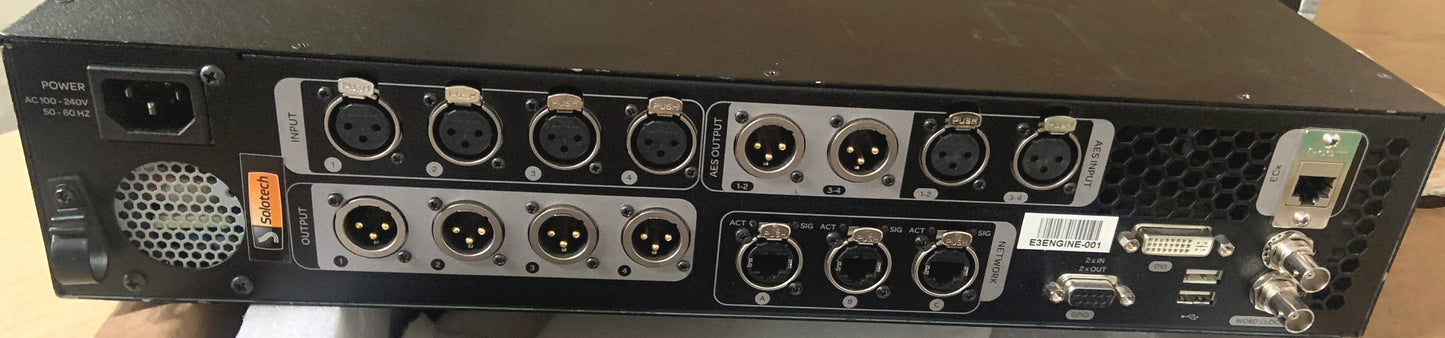
The E3 engine provides mix position audio I/O, and connections for synchronization, utility and control. The E3 engine also houses the main CPU, DSP, and system drives for the S3L-X system. The E3 engine is located at the mix position along with the console.
Audio I/O:
- Four analog mic/line XLR inputs with mic preamps for connecting microphones or line-level devices at the mix position
- Four analog line-level XLR outputs
- Two stereo AES/EBU digital inputs
- Two stereo AES/EBU digital outputs
Synchronization, Control and Utility Connections:
- Three Neutrik etherCON RJ-45 Ethernet Network ports for connecting to the S3 control surface and Stage 16 boxes
- One standard RJ-45 Ethernet port for connecting to a client computer or networking equipment to enable ECx Ethernet Control remote system control
- Three external USB 2.0 ports for connecting USB storage devices (for data transfer, and for 2-track recording and playback), iLok USB Smart Keys (for plug-in authorization), and compatible MIDI devices
- One internally-mounted, secure USB 2.0 port for an iLok
- 16 channels of MIDI input and 16 channels of MIDI output via a compatible external USB MIDI interface
- DVI video monitor port for software screen display
- Word clock I/O for digital clock synchronization
- One RJ-45 (100 BaseT Ethernet) port for ECx Ethernet Control remote system control
- One GPIO port (DB9 connector) providing two GPI inputs and two GPI outputs
- An internal universal PSU (100V to 240V nominal 50–60 Hz) accepting standard IEC AC power cables
CPU, DSP, and System Drives:
The E3 engine houses the CPU, Avid Pro Tools|HDX-powered DSP, and system drives that provide the processing power to run the VENUE software and plug-ins for your system. The USB ports on the E3 engine allow you to do the following:
- Update and restore your VENUE system software
- Install compatible plug-ins
- Transfer VENUE Show files and other data
- Record and play back 2-track audio